Page 1 of 1
Re: SketchUp with Cura 2.3.1
Posted: December 4th, 2016, 1:39 pm
by Amedee
Hi!
Maybe the first things to check are the Cura preferences. There is an evil one called 'Scale large model' which is checked by default and that one will almost silently resize your models...
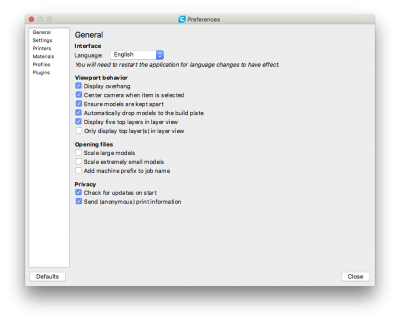
- Cura Prefs
Re: SketchUp with Cura 2.3.1
Posted: December 4th, 2016, 1:50 pm
by Izzy
Welcome Jockel, hope you get your problem solved, Where are you located?
Re: SketchUp with Cura 2.3.1
Posted: December 4th, 2016, 1:52 pm
by LePaul
Yeah many of us got dinged by that auto scaling. I thought they changed the pop up to alert you it had been scaled down to stay on the screen longer?
Either way....it should be OFF by default, in my opinion!
Re: SketchUp with Cura 2.3.1
Posted: December 4th, 2016, 3:50 pm
by Izzy
Hi Joachim,
Paul will confirm, but yes it has rescaled your part,
Image 2 it has shrunk to fit, image 4 it is too big for the print area.
It may be that your STL output has picked up a large surface or plain if it is a part that should fit within a 220x220 box.
Re: SketchUp with Cura 2.3.1
Posted: December 4th, 2016, 4:08 pm
by LePaul
Be aware that in many cases the part will fit...when the orientation has been adjusted (rotated, moved vertically, etc) But, for some reason, Cura leaves that setting on by default, so it shrinks it to fit the load view....which sucks. I had several parts shrunk down a few percent and I didn't notice it until I tried aligning different portions of the assembly. They owe me some filament!!!

Uncheck that option Izzy mentions and move the part around to fit as needed.
Re: SketchUp with Cura 2.3.1
Posted: December 5th, 2016, 2:01 am
by Amedee
If my memory serves well, there is also an option in sketchup to save ´selected objects' instead of ´all' .
That way you don't have to delete anything.
On a side note, I used sketchup quite a lot in the past, but I eventually stepped away from it because it is too easy to make non-manifold models which won't be printable...
Re: SketchUp with Cura 2.3.1
Posted: December 5th, 2016, 9:27 am
by LePaul
What's your preferred program now?
Re: SketchUp with Cura 2.3.1
Posted: December 5th, 2016, 9:41 am
by Amedee
It depends on what you are doing...
For what I do, I ended up using
Fusion 360. It is free for students and hobbyists.
I like
this chart -- it is not very recent, but it gives some overview...
Re: SketchUp with Cura 2.3.1
Posted: December 5th, 2016, 10:03 am
by LePaul
That's great!
Re: SketchUp with Cura 2.3.1
Posted: December 6th, 2016, 4:43 am
by nallath
LePaul wrote:Yeah many of us got dinged by that auto scaling. I thought they changed the pop up to alert you it had been scaled down to stay on the screen longer?
Yea, It should also no longer scale to 99%. It should only start scaling if it's way to big / small
LePaul wrote:
Either way....it should be OFF by default, in my opinion!
This validates my point that most people here are engineer minded. Most artists tend to want this, as they want something that just works (regardless of it being "correct").
Re: SketchUp with Cura 2.3.1
Posted: December 6th, 2016, 9:50 am
by LePaul
I guess I like the simple way old Cura did it. If it wasn't yellow, it didn't fit.
You went into scale mode if it was huge and adjusted accordingly.
Re: SketchUp with Cura 2.3.1
Posted: December 6th, 2016, 11:11 am
by nallath
Uh. Old cura also scaled
